Posts tagged "Content Creation"

Brand ambassadors affiliates

What’s Better? A Brand Ambassador or a Brand Affiliate

April 17, 2026 Posted by Maisie Lloyd Round-Up 0 thoughts on “What’s Better? A Brand Ambassador or a Brand Affiliate”

What is a brand ambassador?

A brand ambassador is usually a long-term partnership between a brand and a celebrity/influencer, where they act as a representative of the company. Some of the responsibilities of a brand ambassador extend beyond representation; they may also need to:

  • Promote the brand
  • Create content for it
  • Attend events hosted by said brand
  • Develop a rapport with customers
  • Often, ambassadors will wear the products or use services year-round as part of their contract

Brand ambassadors can be paid, though the approach will depend on the business. Some may pay per post, some brands may offer a fixed salary, while others may provide products or services at a reduced price or remove costs altogether.

What is a brand affiliate?

Brand affiliates are a short-term relationship between a brand and an influencer/celebrity, often collaborating for a campaign or the release of affiliate codes through partnerships. Some of the key tasks they may undertake during this period include:

  • Sharing products on social media
  • Creating promotional content
  • Delivering measurable assets (on which they will measure performance)

Brand affiliates are often paid partnerships, where the engagement and sales made through their code earn them a percentage of the revenue.

What are the key differences between a brand ambassador and an affiliate?

The two roles can look very similar on the surface, but they’re quite different in their structure, motivation and relationship with a company.

The nature of the relationship is often quite different. A brand ambassador has a long-term, closer relationship with the brand. Reflecting values and identities aligned with branding. By contrast, an affiliate relationship is more transactional. They help promote products when it benefits them, without needing to be aligned with brand values.

A key difference between an affiliate and an ambassador is the payment structure. Affiliates are only paid by performance, usually earning a commission on each sale made with their tracked link or code. While ambassadors are often paid or are gifted free products and are also given exclusive access.

Expectations in terms of brand representation often differ quite drastically. Ambassadors take on a role as a face for a brand, often working on events, product launches and campaigns. They establish a relationship with both the brand and its customers.

The style and type of content created for a brand. There’s an overlap in terms of the content expectations placed on an affiliate or ambassador.  Ambassadors usually produced consent that is designed to feel authentic, with lifestyle-based content of the product being used. Affiliates are often associated with more sales-based types of content, whether that an ad, or softer types of content like their top 5 products.

Commitment levels vary for affiliates and ambassadors, but generally speaking, ambassadors are loyal to the brand, avoiding promoting any competitors. Whereas an affiliate doesn’t need to concern themselves with what brands they associate with.

Which is better for my brand: A brand ambassador or a brand affiliate?

Either role is inherently “better”; it depends on the goal. For brands, ambassadors are better for long-term brand building and trust, while affiliates are better for driving immediate sales and measurable results. For creators, ambassadorships offer stability and stronger partnerships, while affiliate roles offer flexibility and performance-based earning potential.

Each serves a different purpose depending on the goals of the brand or creator. Ultimately, the choice between a brand ambassador and an affiliate comes down to whether the priority is building long-term relationships and trust or driving short-term, measurable results.

Content chunking

What is content chunking?

January 30, 2026 Posted by Maisie Lloyd Round-Up 0 thoughts on “What is content chunking?”

Content chunking is one of the latest terms attributed to the way we structure content, particularly so that it is optimised for AI responses.

Content chunking breaks long-form content down into digestible logical chunks, so it’s easy for the AI to dissect the relevant information. This means shorter pieces of text, listicles, and clearly defined content hierarchies, along with methodical wording in both text and sub-headings to identify the key topics being discussed.

Does my business need to start content chunking?

Content chunking isn’t necessarily a new approach to creating content; in fact, it’s more common than not to accommodate readers with shorter, scannable and ultimately digestible pieces of copy.

However, utilising this approach as a framework for content can be useful if businesses feel it’s in their interest to push their content in AI responses.  In some cases, content chunking isn’t suitable for the type of content being produced. For instance, a research paper’s most appropriate format is, as it has always been, a long-form investigation. If it requires context to understand it, then chunking it can remove the necessary detail required to understand the discussion.

Equally, some content can’t be chunked because it’s already short, i.e. FAQs. It can unnecessarily bulk content which does not need it, detracting from its value and reducing its contextual relevance.

The benefits of content chunking include:

  • Increased visibility on search engines and AI engines
  • Increased chance of click-through rates when people want to explore sources
  • Authority is developed with audiences and engines as you’re being ranked higher
  • Content becomes more scannable to readers, which can help with engagement
  • Content chunking can help make retrospective content updates quicker and easier

What are some examples of content chunking?

Clear Topic Boundaries

Each section should have a specific topical focus, keeping each paragraph to one specific idea. This works in content chunking because it defines different areas of a discussion, making it easier for AI to make the distinction between what is and isn’t contextually relevant.

This ensures each chunk works independently, making it easier for AI and other engines to directly pull into the results

Structural clarity

Utilising formatting to signal different segments, whether that’s through headings and subheadings, bullet points, labelling, and grouping by theme. It creates content that is easier to digest, and makes it clear what it’s trying to achieve.

Consistency in content length

Each chunk should fall between 100 and 300 words each time. Keeping this consistent ensures your content is effectively broken down, splitting it between 1-3 paragraphs.

Each section should ideally be uniform in length, making it easier for the AI to understand what content needs to be retrieved.

Logical entry and exit points

Each section should have a logical beginning and end. Natural conclusions in content chunks are essential for properly breaking down content. It’s important that it doesn’t cut off mid-idea or instruction.

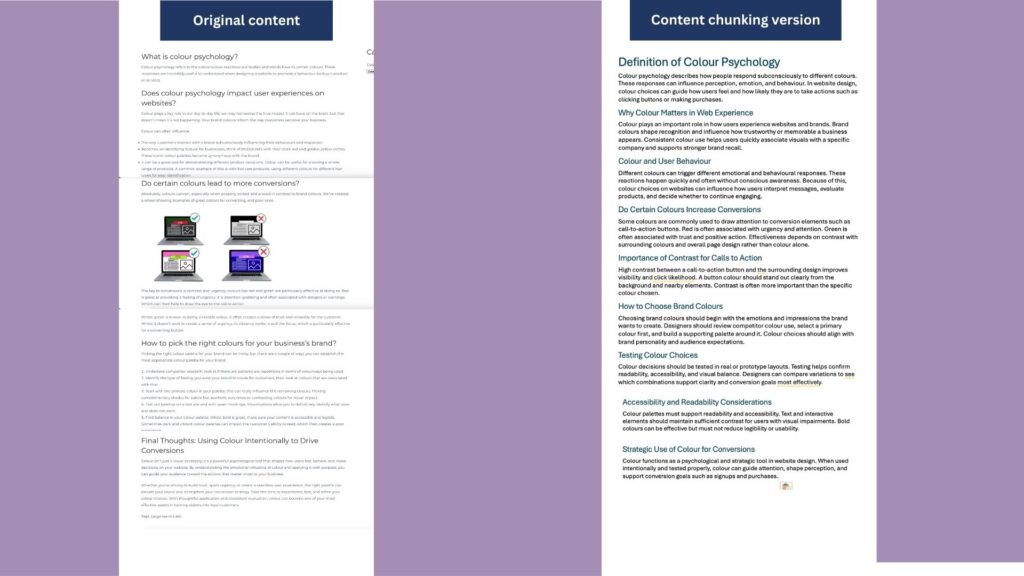
This is how content chunking looks on our blog on colour schemes in branding, before and after.

Content chunking (1)

In summary, content chunking is less about changing what you say and more about improving how you structure it. By organising ideas into focused, clearly labelled sections, you make your content easier for both people and AI systems to understand, retrieve, and reference. Not every piece of content needs to be chunked, but where it fits, this approach can improve visibility, usability, and long-term value. As search and AI-driven discovery continue to grow, clear structure and logical flow will play an increasingly important role in how your content performs.

Shorts

Boosting Channel Viewership with YouTube Shorts

January 16, 2026 Posted by Matthew Widdop Round-Up 0 thoughts on “Boosting Channel Viewership with YouTube Shorts”

Growing a small YouTube channel can often be a frustrating experience for up-and-coming channels. The platform is extremely competitive, and the algorithm can often feel almost random, sometimes pushing your videos to achieve a healthy number of views, while other videos underperform, leaving you to wonder where you went wrong. YouTube Shorts can be a great way to help boost channel performance, both in the early stages of content creation and for already established channels.

Why YouTube Shorts are Important

On traditional YouTube videos, it is very difficult to be able to gain traction on YouTube search pages due to the highly competitive nature of most content. Outside of getting your video to appear on Google’s SERP, most people’s views will typically come from a combination of subscribers already following their channel and some new viewers from Google or YouTube. This is what makes YouTube Shorts so important; shorts are much more viral in nature, and don’t require subscribers to get views. YouTube will show your shorts to new users early on if they like similar content, and if your shorts perform well, a snowball effect will take place, which can see your views rise rapidly in a short amount of time.

How to make a Short Perform

There are a couple of key elements to making sure a short performs optimally, and most importantly, the hook. In the opening 2 seconds, your script needs to be able to explain what your video is about and be engaging enough for audiences to want to learn more, making it the most crucial part of your video. Nailing this and keeping people intrigued is probably the most important part of any short, but the pacing is also something that needs to be taken into consideration. If people are watching your shorts in full or on repeat your much more likely to get a viewership boost from YouTube. Pacing your short so it doesn’t lose people’s interest is important, keeping it engaging all the way through.

Turning Shorts into Subscribers

While shorts are great for attracting new viewers, one way in which they are not as reliable as long-form videos is in turning viewers into subscribers. Due to the short-form nature of YouTube shorts, people often flick through from one to the next and don’t have much incentive to stop and look around your channel, which people typically do more often with longer-form content. Therefore, finding ways to use your shorts to attract users to your channel is important. A good way to improve subscriber count with shorts is by including a call to action, such as breaking the short up into 2 parts and explaining you have a part 2 on your channel or linking your shorts to full-length channel videos, thus eliminating the limitations of shorts.

Understanding how YouTube shorts work allows you to accelerate the growth of your channel to new heights, wether your just starting or you’re already an experienced YouTuber.

B2B VS B2C

Is content marketing the same for B2B and B2C

October 31, 2025 Posted by Maisie Lloyd Round-Up 0 thoughts on “Is content marketing the same for B2B and B2C”

The objective for B2C and B2B marketing is quite similar in the sense that it looks to engage and evoke a response. It’s the approach and strategy that tend to diverge from each other, as the audiences differ drastically.

Business-to-Business Content Marketing

Business-to-business content marketing looks at how it can push a product or service for an entire business/ team of employees, rather than a singular audience member. This requires an entirely different strategy than B2C content marketing, as it’s looking at long-term objectives like building trust, a reputation, and ultimately working towards a return on investment.

  • Build rapport, trust and a reputation with content for this audience
  • Context-driven content that appeals to a broader audience
  • Data-led decision-making means it’s a longer sales funnel, and as such, content should serve to support but not be the driving factor in converting

Business to Client Content Marketing

Business-to-client content marketing is the typical style of marketing we encounter, from newsletters from your favourite brands to the ads we see as we scroll aimlessly on social channels.

  • Customers are emotionally driven by products; it’s much more about the individual experience than anything else
  • Behaviour and interest-driven
  • A shorter sales cycle, which looks to inspire momentary responses like impulse buying
  • An overall softer and simpler way to approach the audience, as it looks to create a sense of relatability or intrigue, which then encourages engagement

The Key Differences between B2C and B2B Content Marketing

There are some major differences in how content marketing is done when comparing B2B and B2C practices. The main things content marketing boils down to:

The Audience – The audiences differ so much, and the ways they discover and explore content to reach the end goal (a service or item). Content marketing tends to drive conversions much faster for B2C than its B2B counterpart, which often requires a slower, more thought-out approach to investing in a product or service.

This means the journey taken and the way they interact during that journey will be entirely different. While a B2C customer may become invested, feel a connection to a brand, a business (B2B) would make decisions that are informed by their existing strategy, budget and so on, which is what makes it a lengthier process to convert.

The Type and Tone of Content

Business-to-business content often adopts a no frills, factual, professional format, cutting through any fluff and getting straight to the important details. Whilst this doesn’t always apply to B2B, it’s fairly typical to still see this matter-of-fact way of producing content.

B2C businesses can take more creative liberties with the styles of content, the message used for content, and the tone that it’s communicating. The tone is often much softer, relatable and approachable for a customer. It’s meant to connect with the audience on a deeper level than that of a B2B piece of content.

Content Formats and Destinations

Another difference in how content is marketed to these different audiences is via the format of content and the destination at which it is posted. You’ll find B2B companies posting in places that are widely seen as professional, including LinkedIn and paywalled websites.

Final Thoughts

While B2B and B2C content marketing share the same core goal—to engage audiences and inspire action—the paths they take to get there are worlds apart. B2B thrives on logic, trust, and long-term relationship building, while B2C speaks to emotion, immediacy, and personal connection. Understanding these nuances allows brands to tailor their content strategy with precision—meeting their audience exactly where they are and driving meaningful results that last.

Competitor content analysis

Competitor Content Audits: What Are They and Why Do We Conduct Them?

October 10, 2025 Posted by Maisie Lloyd Round-Up 0 thoughts on “Competitor Content Audits: What Are They and Why Do We Conduct Them?”

What is a competitor content audit?

A competitor content audit analyses the various competitors of a business to measure their performance and output to create a better-informed content marketing strategy.

A competitor content audit will analyse all the content of a competitor’s website, whether that’s service or product pages, the home page, or their blog. It evaluates the quality of the content by assessing its relevance, usefulness, and uniqueness. This is then compiled into tangible optimisations and recommendations.

Why do we do competitor audits?

Competitor content audits allow us to create a data-informed content strategy by identifying areas for opportunity and growth. This ensured that your business keeps up with and eventually propels past competitors by learning from their failures and accomplishments.

We look for:

  • The topics covered
  • The length and structure of the content
  • The formats used
  • The quality of assets/ if assets have been used
  • Content performance
  • What type of search intent does the content cater to

How to do a competitor content audit

1.     Finding competitors

Establishing your competitors is ground zero, then you build up. You can figure out who your competition is in a couple of different ways. The first is through search. For instance, if you’re a furniture shop, you’d look at established brands selling the same products, as well as more local competitors.

The second route is to survey the public to get a consensus about preferred brands for your specific industry. If you’re already established and have found you’ve lost a customer, follow up and find out with whom they’ve opted with.

Using review platforms to identify the audience perception of brands, i.e Trustpilot, Yelp, and Tripadvisor.

2.     Competitor analysis tools

Utilising competitive analysis software is what elevates your evaluation, utilising data to accurately depict the successes and pitfalls of competitors’ content. We utilise tools like SE Ranking, Crunchbase, and Ahrefs. These tools quantify success through metrics like traffic volumes, keyword tracking, automating the tracking process and making identifying trends simpler.

SE Ranking

An all-in-one SEO platform that streamlines features like tracking keyword ranking against competitors, assessing page performance, performing backlink analysis, and monitoring any changes like new page launches.

Ahrefs

Ahrefs is another leading SEO intelligence platform, allowing marketers to undertake backlink analysis, rank tracking, site audits, content exploration, along competitor analysis.

Crunchbase

Crunchbase is essentially a database of businesses with predictive intelligence capabilities by compiling numerous sources to paint a picture of a company’s performance. Its interface contains a growth score, insight signals and growth predictions, which can be great for identifying competitors gaining momentum.

3.     Comparative analysis to identify opportunities

Once you’re set up on your competitor analysis tools, it’s time to begin analysing the data, tracking against their keywords, and assessing the quality and volume of their backlinks.

Data is super telling, so if competitors are ranking poorly for shared keywords, there’s an opportunity for you to surpass them by optimising for that particular keyword. Unfurl your competitors’ strategies through the data. Once you identify their successes, look at the content on their site and make a note of why it is performing.

4.     Outlining the next steps

Once you’ve painted a picture of what is and isn’t working for your competitors, you can apply those findings to your content performance. Establishing areas where you can improve your content, increase your output and achieve the goals your business has set out to reach. 

The impact of not creating content

What happens if my business stops creating content?

September 26, 2025 Posted by Maisie Lloyd Round-Up 0 thoughts on “What happens if my business stops creating content?”

Whether it’s a drought of ideas or you no longer see the value in creating content for your business, it’s a fundamental element of an effective marketing strategy. There are plenty of reasons why a business may stop creating content, but it’s important to understand the value and direct impacts on your business’s performance.

The short-term effects of not creating content as a business

In the short term, the effect may be only slight, seeing things like a small drop in traffic, a reduced click-through rate, or low volumes of people unsubscribing from email campaigns.

But these small changes can have a domino effect, which can cause websites to tank in rankings, which can then have a knock-on effect on getting leads and conversions for their product or services.

The long-term impacts of not creating content as a business

The long-term consequence of neglecting to create and update content on a website is a severe detriment to the success and longevity of a website.

  1. Content begins to become outdated.
  • Audiences become estranged from the brand.
  • Visibility online is significantly impacted.
  • Lead and conversions are directly impacted.
  • The rebuilding period takes longer to restore growth.
  • Budget may be wasted on crawl spend.
  • The impression made on new visitors is poor, and the user experience is negatively affected.
  • Your competitors stand to exceed where you are failing.

How to remedy content stagnation

Creating content is only worth doing if you want to add value to your brand and build an audience. Without intention or goals, there’s no purpose in producing content.

The approach you take really matters; breaking it down into manageable steps makes producing content much simpler.

Step 1: Audit your existing content

If you have content on your site, create a document like an Excel sheet, track the metrics for the content. Looking at things like the average engagement time, click-through rates, and volume of users looking at the content, within a set period.

This can give you a snapshot into what has and hasn’t worked for your brand. Allowing you to identify the top performers, pieces of content that could benefit from an update, and opportunities to remove outdated content that no longer serves your site. Ultimately, this will shape the way you begin to ideate and map out your content calendar.

Step 2: Ideate

This step requires you to research and ideate for pieces of new content. Utilising competitor audits can also expedite this process, as it can help you to recognise content gaps and opportunities for inspiration.

When researching, tap into various resources, look across social platforms and on forums to find conversations that relate to your business and its offering. Using journals, books can help not only bolster your understanding of topics but also help you uncover new angles to approach creating new content.

Step 3: Begin planning

This is the part in the process where you begin to create a physical document outlining your ideas, assigning dates and responsibilities, and mapping the structure and information needed to be included.

If you’re concerned about the resources your business has, thus impacts your ability to produce, try making one really great piece of content each month. This will ensure you don’t fall behind your peers, and your audience is still being catered to.

We delve into the types of things you need to include in your editorial calendar in our “What is the purpose of an editorial calendar” article. We recommend planning for 6-12 month periods and conducting content audits to track performance.

Step 4: Put your planning into practice

Once your content calendar is mapped out, it’s time to start executing your plan. Create your content with confidence, follow your plan and measure your success. Whilst not every piece of content is going to be a sensation, it serves as the foundation for your business’s online performance to grow.

Maiaise Featured for Guest Posting

Guest Posts: What, why, and How They Work

August 29, 2025 Posted by Maisie Lloyd Round-Up 0 thoughts on “Guest Posts: What, why, and How They Work”

What is a guest post on a blog?

A guest post is when you—or another website’s content creator—produce content to be published on a different company’s blog or website. The goal is usually to build links, authority, and visibility.

For this to work, the content must align with the host website’s audience and be relevant to its theme. Guest posts often come from industry experts who collaborate with companies in their sector, offering unique insights and an authoritative perspective.

Benefits of Guest Posting for SEO and Brand Growth

Absolutely, guest posts can be an incredibly useful tool within your content strategy. Some of these strategic advantages include:

Content versatility – Keeping your content fresh, adaptable, valuable and unique is a prime reason to incorporate guest posting into a content strategy. It helps to diversify the opinions, experiences, and expertise reflected on the site.

Building authority and trust – Authority factors into how Google ranks content; having better authority improves the chances of being displayed higher on the SERP. Authority ultimately reflects on the trust established by Google and the audience.

Increased referral traffic – If backlinks are established, it can be a great way to improve referral traffic on a website.

Raising brand awareness – If you’re creating content for another site, or vice versa, it can be useful for promoting your brand and raising awareness through sharing expertise with a new audience.

How to create opportunities for guest posts

The best approach to seeking out guest post opportunities is to identify 2 things: the figure of authority you’d like to create content for, or a hosting site which is relevant to the topics being discussed.

Creating a guest blogging strategy will help you anticipate any potential collaboration. It serves as a framework to ensure the output from the content is optimised for your business.

If you are the writer

  1. Establish a website that is aligned with the type of content you create. It’s important that your content fits the destination it will be published to.
  2. Create a content proposal outlining: the subject matter, the style of content, the length, keywords and structure.
  3. Approach the website with your content proposal and wait for the go-ahead.

If you are the hosting website

If you are the host of the website where you’d like a guest post to be featured, there are a few ways to create opportunities for guest content. The first aspect of finding a creator to produce a guest post is to establish an appropriate voice for your content.

Finding the content creator should begin by researching experts within the field or on your topic. This will help you identify the key authoritative voices that are more likely to have an impact on creating content.

Approach the creator with the concept of the content, outlining any of the key points that will help to ensure your brand is reflected within the content. Consider outlining the following areas to make creating content a bit simpler:

  • The tone of the piece
  • The subject matter
  • The style
  • The length
  • The topic being covered

Guest posting works best when it’s relevant, authoritative, and mutually beneficial. Whether you’re contributing to another blog or inviting writers to yours, it’s a proven way to strengthen SEO, build trust, and expand your brand’s reach.

thought leadership

Thought Leadership in Content Marketing

August 8, 2025 Posted by Maisie Lloyd Round-Up 0 thoughts on “Thought Leadership in Content Marketing”

What is thought leadership?

Thought leadership is a term used to describe content that is shaped by personal insight, experience, or innovations, which contributes to the authority the individual has on a topic. This type of content can only be created by those who have experienced, seen or learned the thing it is creating content about.

Types of thought leadership content?

Thought leadership content can be created in many formats, whether that’s written or audio; there are many ways thought leadership can be communicated. Some of which include:

  • Podcasts
  • Radio
  • Video content
  • Social media posts
  • Blogs
  • Books
  • Journals
  • TV shows
  • Documentaries

What are the key differences between content marketing and thought leadership?

Intent

The objective and positioning of content marketing often differ from those of thought leadership content, as traditional content marketing aims to create content that solves a problem. In contrast to thought leadership content, it looks to start the conversation or at least provoke thought for the reader.

Their uses

The intent behind content is what ultimately shapes its type — and how it’s used will differ depending on that intent. Take the topic of self-help, for example:

  • Thought Leadership: Imagine a self-help guru sharing a deeply personal story — one shaped by real struggle, reflection, and growth. Their content might explore complex emotions, challenge mainstream thinking, or propose new frameworks for personal development. The goal isn’t to rank on search engines or drive quick clicks — it’s to spark conversation, inspire trust, and position themselves as a unique voice in the space.
  • Traditional Content Marketing: On the other hand, a blogger focused on SEO might publish an article titled “10 Proven Self-Help Techniques to Improve Your Life”. This piece is structured, keyword-optimised, and aimed at delivering clear, digestible tips. It’s valuable, but transactional — designed to answer a question or solve a problem quickly, often without diving into personal narrative or controversial viewpoints.

The objective

Content marketing is typically driven by the goals to sell a product or service, whereas thought leadership looks to build trust, reputation and authority of an individual.

Its ability to influence

Thought leadership can change the industry narrative, which the content refers to, especially if the content is received well or has a high impact on that industry. This is where traditional content marketing diverges; it’s less likely to create a change within the industry, it’s just due to the approach which has been taken to discuss a topic.

Strategising thought leadership content for your marketing strategy

Creating thought leadership content is a valuable aspect of a comprehensive marketing strategy, looking to position you or your brand as a voice of authority within an industry.

Creating a mixed marketing strategy that wields both traditional content and thought leadership content is essential for establishing authority and increasing the chances of content being displayed on the SERP.

You can do this by creating content that explores your unique line of expertise in depth, whether that’s discussing any ideas, industry innovations, or exploring opinions and experiences in the sector.

Maisie featured

How to create and write content for blogs

August 5, 2025 Posted by Maisie Lloyd Round-Up 0 thoughts on “How to create and write content for blogs”

Have you ever found yourself stuck writing the first word, deleting it, then another, and oh no, that’s not right either…there’s no hope.

Only kidding.

Producing copy for a blog can be quite straightforward once the process is in place. In this article, we’ll break down the key stages of writing copy, as well as collating some of the best copywriting tips. Providing you with the confidence to strategically devise, craft and publish high-quality content.

Research

Research is fundamental. It gives your blog authority, structure, and focus, all of which help you meet the needs of search engines and readers. It deepens our understanding of topics and often enhances the quality of the work.

  • Identify the key points in your discussion, allowing you to break down each section or topic. Once you can identify the sections of your discussion, you can undertake research it the more niche subject matters of your discussion.
  • Research is super important; it equips you with an understanding of the topics you are discussing. Google and respective search engines will trawl the information you have given and provide the ranking based on the quality, usefulness and how SEO friendly it is.
  • Outline any content gaps, particularly when conducting competitor analysis. It will allow you to highlight any areas for discussion which you’ve not yet covered within your content.

Research can be conducted in many ways, the use of search tools, books and journals, as well as conducting an analysis of competitors and search engine results.  For further guidance, you can check out our Art of Research blog, which expands on the whys, how’s and the approaches you can take.

Beginning the writing process

Page structure

When starting to write your copy, it’s important to identify the structure of the content. Outlining a title and sub-headings is a great way to gauge the layout, the number of words per section and how to tie each section together.

When developing a title for your work, consider two things: the first is to convey the overarching topic or themes of discussion. The second is to make it entice; consider how to frame the title. Can you phrase it to make it sound useful for the reader? Consider framing it as a question, that way when searchers are inquiring through Google, your content is identified as addressing that query.

Labelling approach

An alternative to framing the title as a question is to grab the attention of the user. Using highly descriptive language allows the user to understand the topic whilst keeping it short and simple. A great example of this would be when you see an article about a celebrity, and it reads ‘So and so stuns on the BAFTA red carpet’. Keeping it short and snappy will typically create curiosity within the reader, encouraging them to read. Subheadings should signpost the different points of discussion. This allows the audience to navigate your article much more easily. Aim to keep the sub-headings super simple; them being easy to find and quick to read will enhance the quality and ease of the reader’s experience.

SEO in the strategy

Search engine optimisation should greatly influence the way content is created. After all, the aim with any written content is to get it to rank, and with great content, the chances of ranking higher increase. Writing content should align with the search intent of audiences. You can ensure content caters to search intent by incorporating the primary and secondary keywords.

Keywords can be found using analytical tools such as Google Search Console, SEMrush and SE Ranking.

Long-tail keywords are search terms with 3 words or more; it is the whole query rather than a single word. Whilst short-tail keywords are short search terms, typically one or two words at most.

To create content that’s optimised for search, include internal links. Improving navigation for both the reader and search engines. If it’s applicable, cluster your content- this also optimises the experience of navigating to relevant content on a site. 

Make sure you’re using meta descriptions, so your content is accurately portrayed within the SERP.

Review & Edit

Once you have written your first or second draft, review the content and make the necessary adjustments. Then the final draft can be written, the final draft should tidy up any sections which need re-structuring, and rephrasing and spelling checks should also be undertaken.

Proofread your copy, not just once or twice, but aim to check roughly three to four times before uploading it. This may be a little bit tedious to do, but ultimately it will ensure professionalism and quality are at the highest it can be.

Ensure any facts, data or case studies are checked, identified, and accredited in your article, as this will be flagged as problematic to Google if not identified.

Publishing

When publishing your content, ensure everything is in the right place, and read through one last time to make sure everything is looking and reading correctly. When saving the work, check that it is labelled in a way that is clear and easy to locate.

Here at Intelligency, we label as follows:

Year/month/date – Name of client – Title of work – Any additional title or information.

Make sure your name and the date of publication are on there; this shows the reader who you are and when the copy was published. This provides them with two pieces of important information: the first being who you are, and then they can go on to find more of your work. Accrediting your work can only be done when your work is clearly labelled as yours. This will also help prevent others from plagiarising.

The last check that should be done is once the article or blog has been launched, checking to see how it looks on the website. This will help you flag any major issues with displays or the content itself. This will ultimately prevent your audience from seeing any errors, which will help maintain your professionalism and the way the content is initially perceived.

If you think this article was useful, please let us know, and if you have any questions or other ‘how-to’ articles you’d benefit from. We are keen to support you in your endeavour to create a copy!

Tagging and categories featured

What are categories and tags on a website?

July 11, 2025 Posted by Maisie Lloyd Round-Up 0 thoughts on “What are categories and tags on a website?”

Tags and categories are labels we use on a website to create order across content, particularly on per-collection pages, where multiple pieces of content are stored. These pages are typically assigned as product category pages or blogs.

There is a distinction between categories and tags, with some similarities shared between the two and some major differences in the way they serve the search engine and the reader.

What are categories?

There are roughly 5-10 categories prescribed to a per-collection page, and the category serves as a label for a specific group, type or subject. For instance, a clothing shop will have the category of tops.

It’s used as an umbrella tag, or a starting point in the search. This means that it will likely include content or products which are more broadly defined than just the category itself.

What are tags on a website?

That’s where tags come in; they help qualify that search further by adding a label including the detail. So, to touch back upon the example from before, within the top category, you could have the unique product pages tagged with:

  • Crop-tops
  • Long-sleeve tops
  • Vest tops
  • Short-sleeved tops

The tags allow you to label that content further, so when someone is looking for a specific niche aspect in content.

Why do we use categories and tags on websites?

Tags and categories help keep content on your website organised for both those searching and search engines crawling your site. It’s a brilliant tool for creating a structure, allowing you to easily pull related tagged or categorised content for it to be displayed to the reader.

We use tags and categories to make sense of the content we put out, which allows people to easily search through a particular type of content, without being inundated with other non-relevant content.

What are the benefits of implementing categories and tags?

Structure – Brings structure to your site by grouping content that shares related topics.

Simple navigation – Allows the reader and search engines to efficiently navigate to and understand the subject of the content.

Enhanced user experiences – User experience is prioritised when content is organised, saving the time spent searching your site, and reducing dissatisfaction with irrelevant content being displayed.

Increasing the chance of discoverability – Using this content structure can make it easier for other content relating to the same category to be discovered. Typically, a category page will be made, where all the products and content are assembled onto one page, making it more discoverable.

How to properly assign categories and tags?

The best approach to take when assigning categories and tags on your website is to use a structured process.

Identifying your categories

You’ll need to begin by outlining the various products and subjects your pages include. This will allow you to narrow down your categories. For instance, a retail brand may categorise by the type of product, whereas a blogger may categorise by topic.

In some cases, sub-categories may need to be introduced, which creates a hierarchical structure between content pages. An example of where subcategories may be used is with a retail brand; they may have an overarching shoe category, then subcategories for each type of shoe.

Incorporating categories and tags on WordPress

To add a category or tag in WordPress, you need to begin by navigating to the posts section. If you’re uploading fresh content, navigate to add a post. This opens up the post creation page, which has a toolbar on the right-hand side.

On the toolbar is a section where you can create categories by simply selecting Add category. The same can be done for the tagging to, you simply need to scroll down on the toolbar to find the tag section and begin to type in your answers.

So whilst tags and categories share similarities, the way they help sort content on your website differs. Each helps to improve the structure of your site, ultimately improving the user’s experience navigating content.

Latest Posts

Categories